Restaurant POS software for Pakistan, with your own ordering website
Pixel & Oak POS is a restaurant point-of-sale system for Windows that keeps billing, kitchen printing, delivery and inventory running even when the internet is down. It comes with your own online ordering website that charges 0% commission, and the Business plan adds done-for-you Google, Facebook and Instagram marketing. Plans start at Rs 2,499 a month, with no setup fee.
- From Rs 2,499 a month
- 0% commission
- No setup fee
- 30-day free trial
- Works offline
Prefer email? [email protected] · we reply within 24 hours.
Built at a real restaurant counter
Pixel & Oak POS runs every day at a busy Karachi pizza delivery and takeaway restaurant, on two counters: the lunch rush, late-night delivery, card and cash, riders, Foodpanda and website orders. Every live feature on this page was built for that counter and is used there daily.
See that restaurant’s ordering website in our work →5,000+
automated tests run before every update
0%
commission on your website orders
100%
of billing, printing and shift close works offline
1 day
to set up your counter and menu
One suite: your counter, your website and your ads
Most restaurants pay one company for the POS, another for an ordering page and a third for ads, and none of them talk to each other. Pixel & Oak POS is all three, built to work together, for one monthly price.
The POS at your counter
Billing, kitchen tickets, cash drawer, riders, inventory and reports on the Windows PC you already have.
- Works with the internet off
- Takeaway, delivery and Foodpanda orders
- Card, cash, wallets and split bills
Your own ordering website
A fast website on your own domain where customers order directly, with no commission and no app in the middle.
- Menu and prices come from the till
- Orders print in your kitchen automatically
- Pick-up and delivery with your areas and charges
Ads and marketing, done for you
On the Business plan we run your Google profile, Facebook and Instagram ads and WhatsApp replies, and make your promo content.
- Google Business Profile kept fresh
- Meta ad campaigns set up and tuned monthly
- A promo video and four post designs a month
Walkthrough
See an order go through Pixel & Oak POS
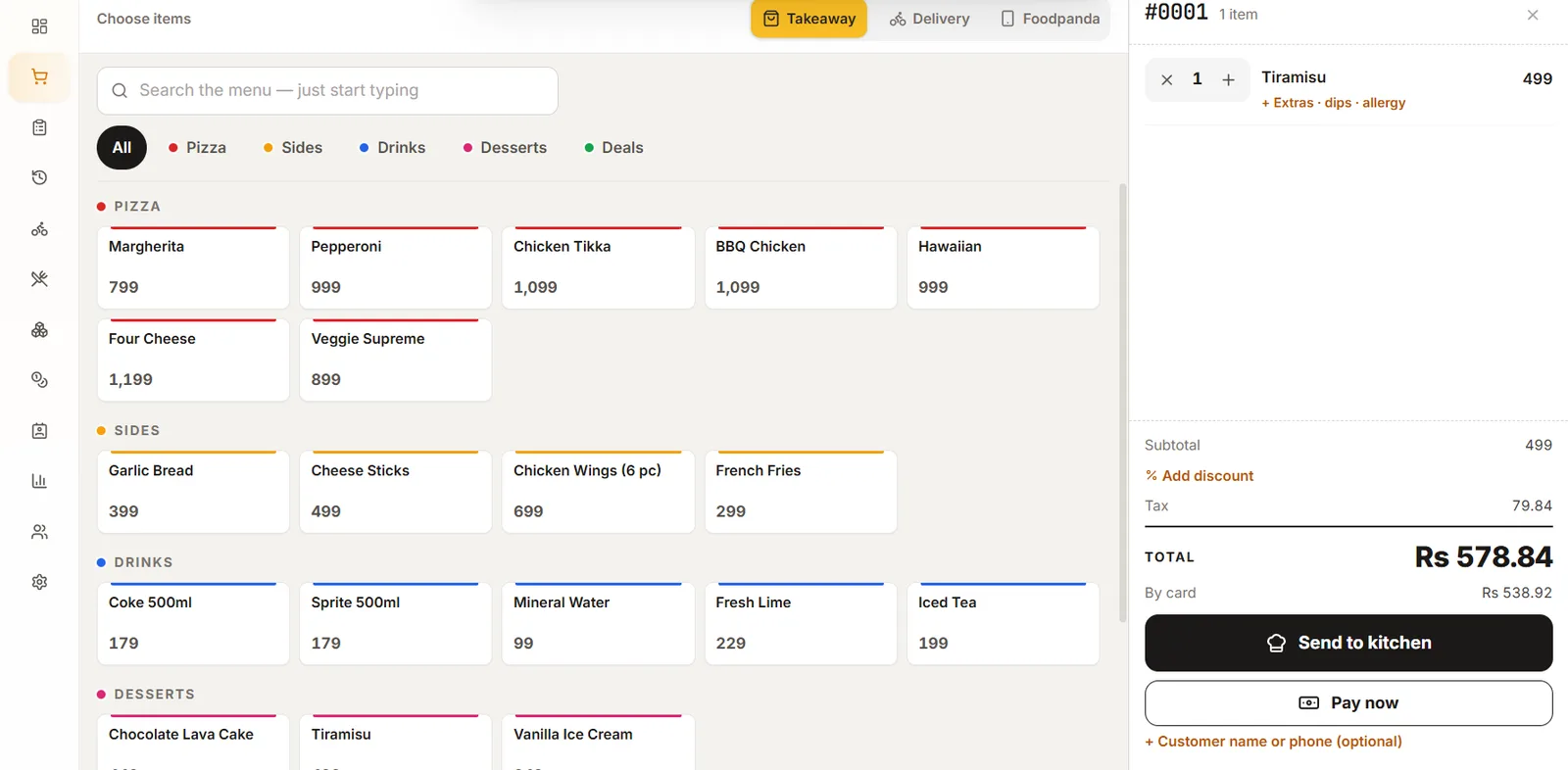
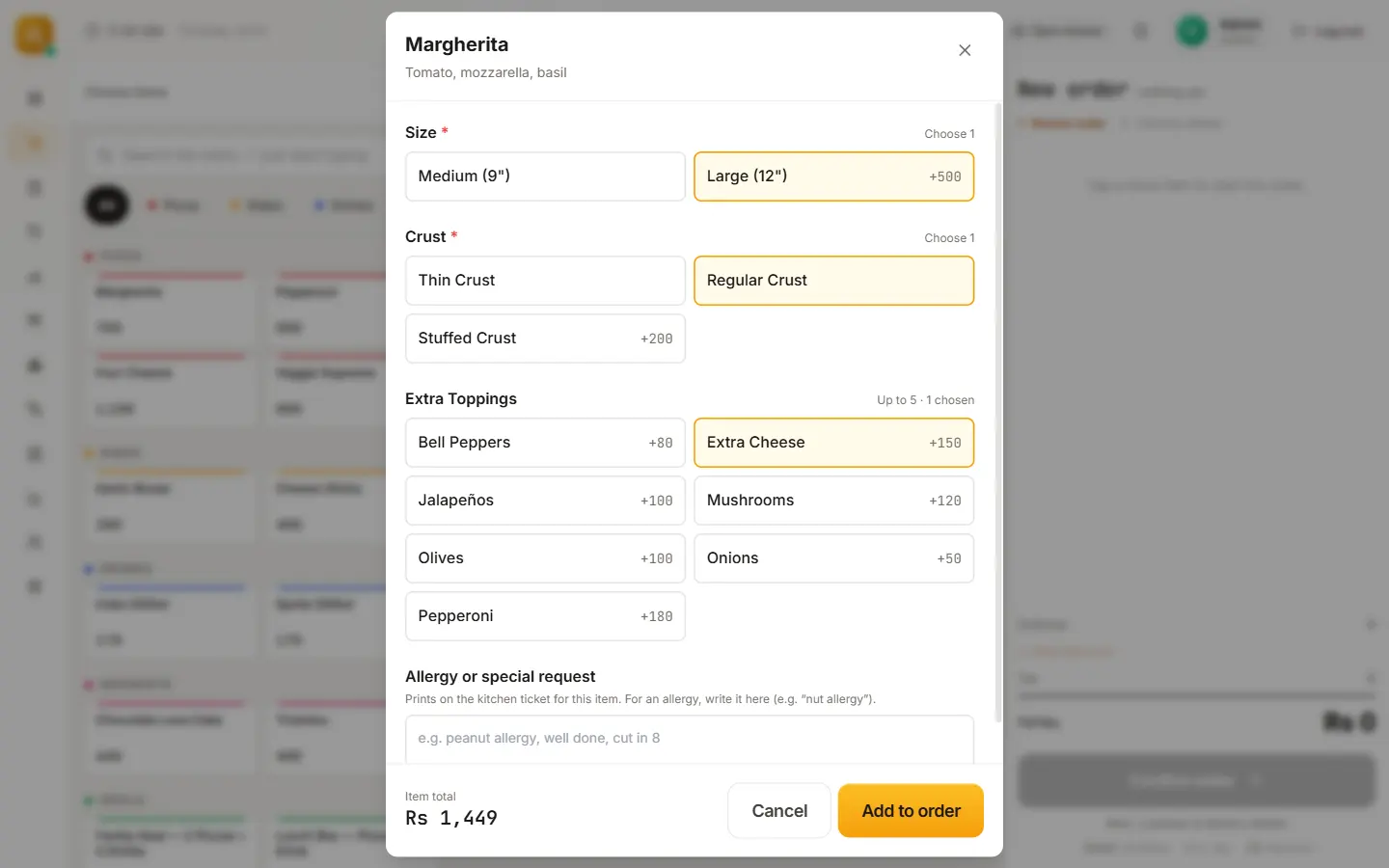
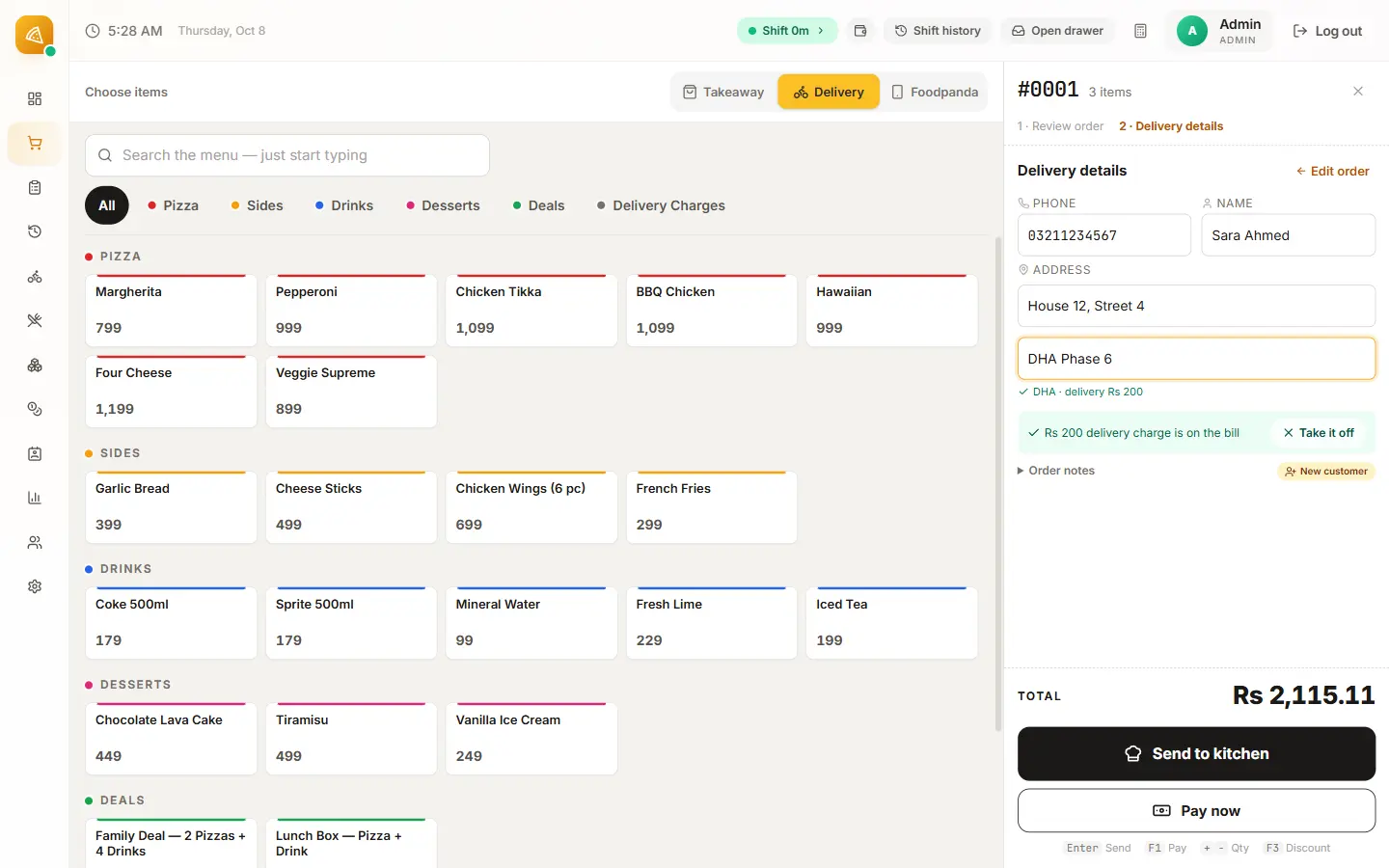
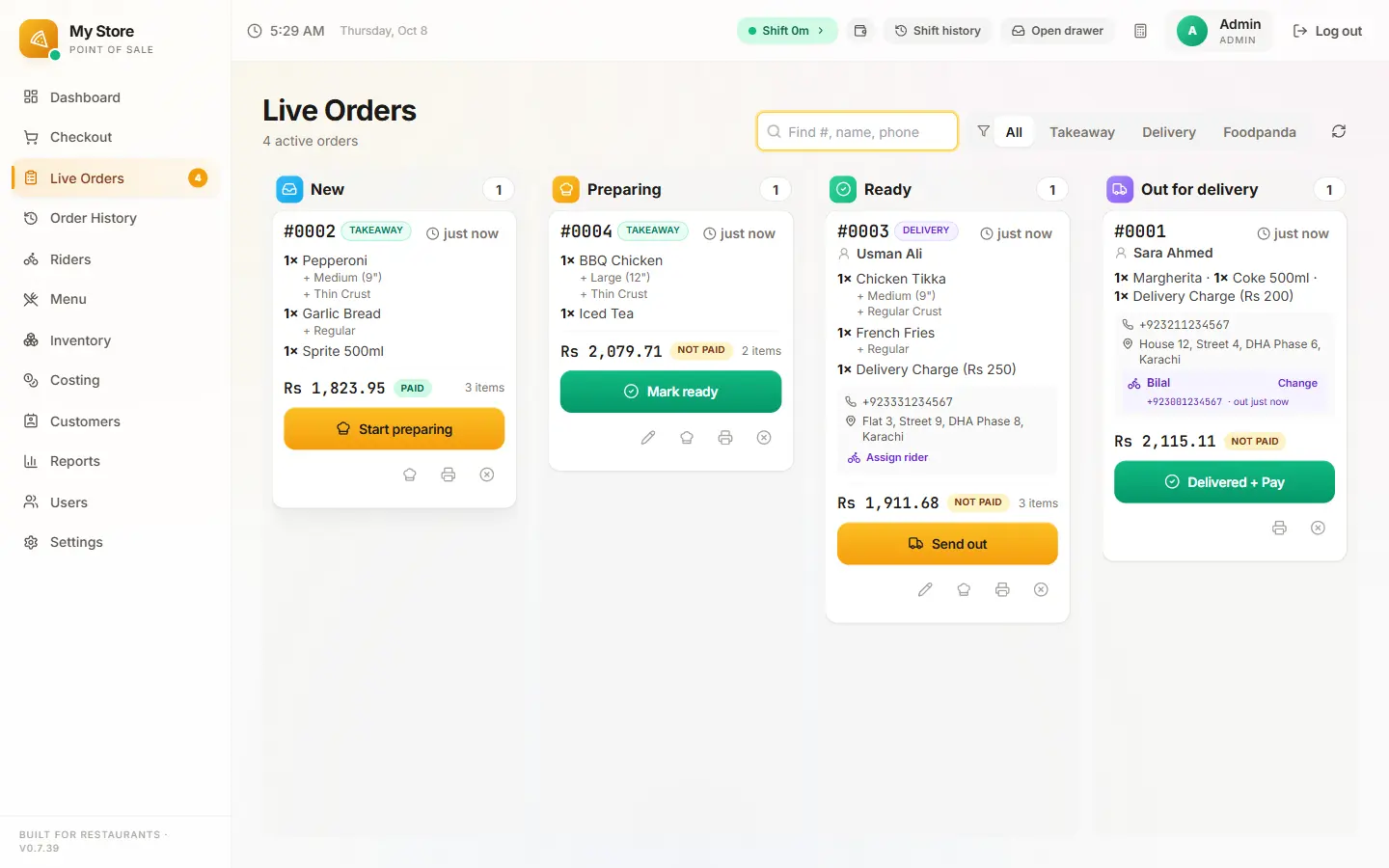
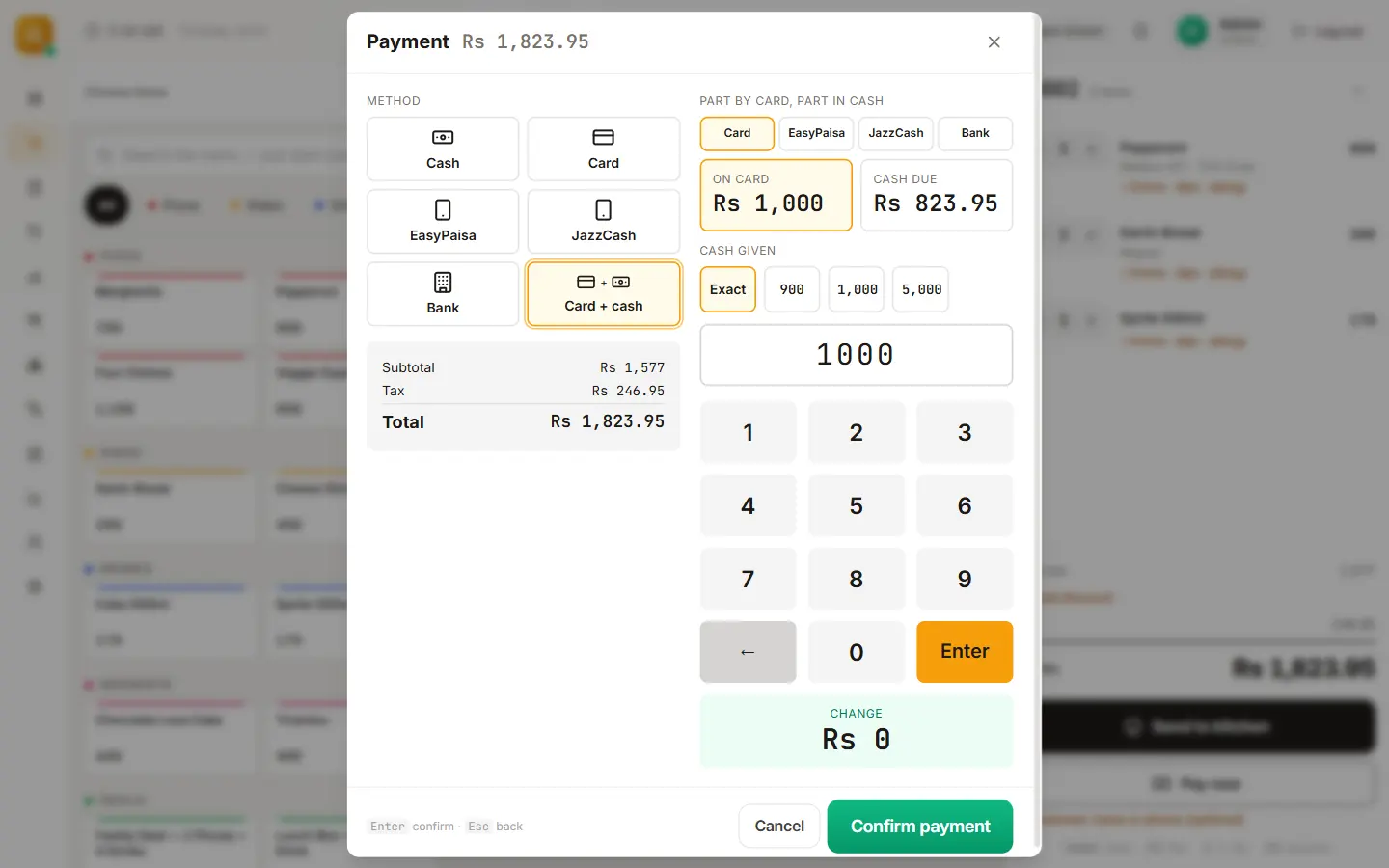
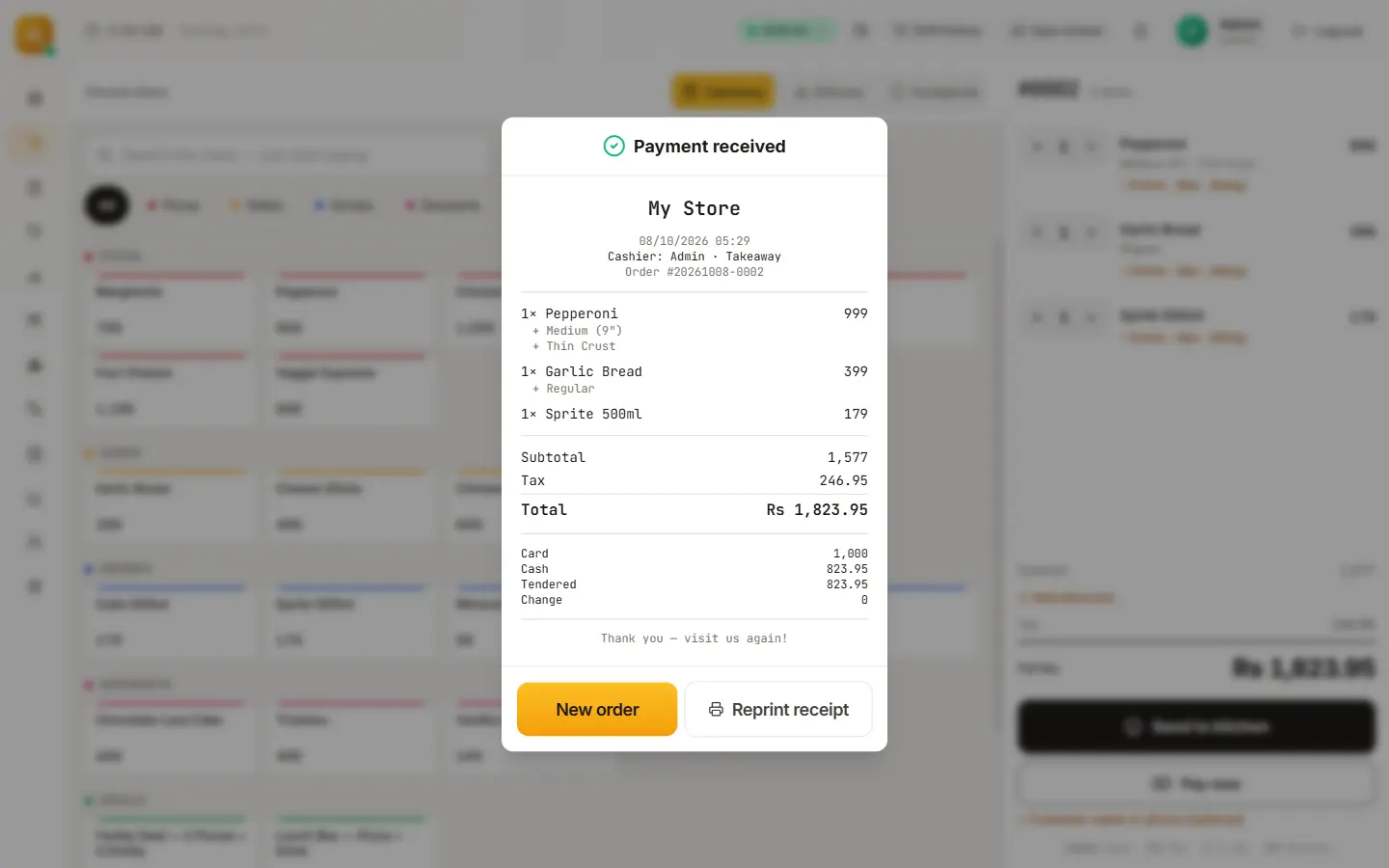
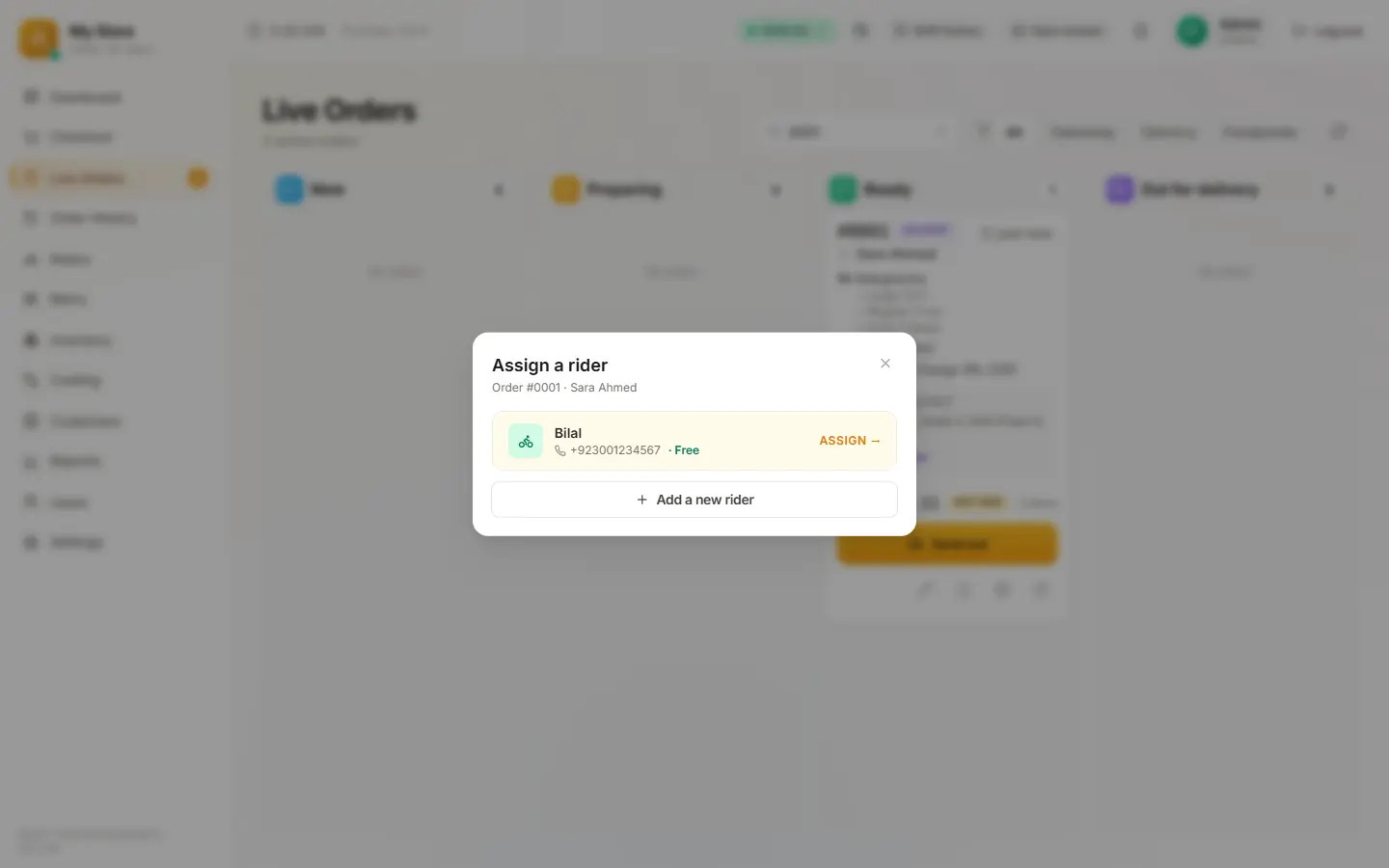
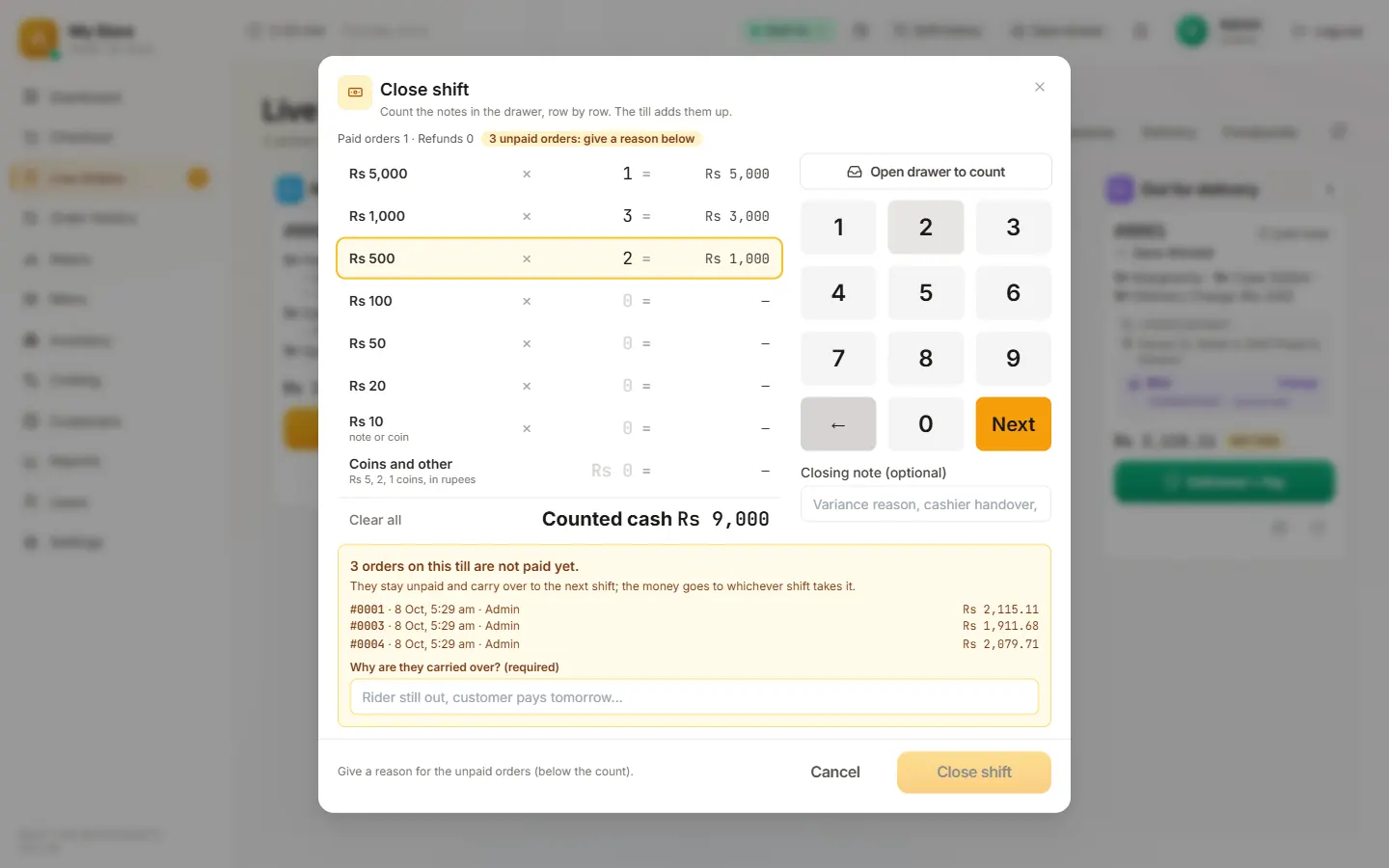
Nine real screens from the till, in the order they happen at a busy counter. It plays by itself; tap any step to jump to it.
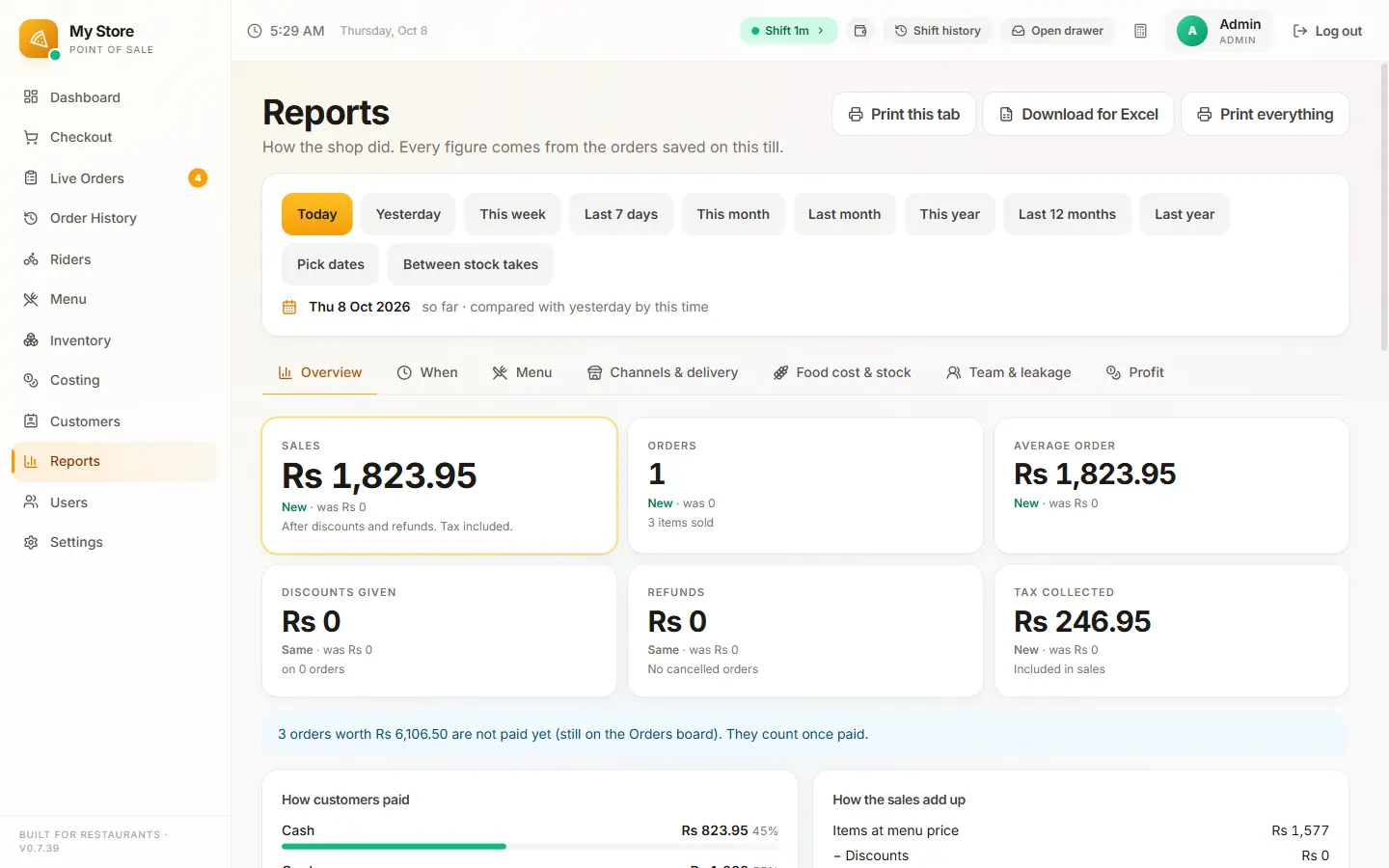
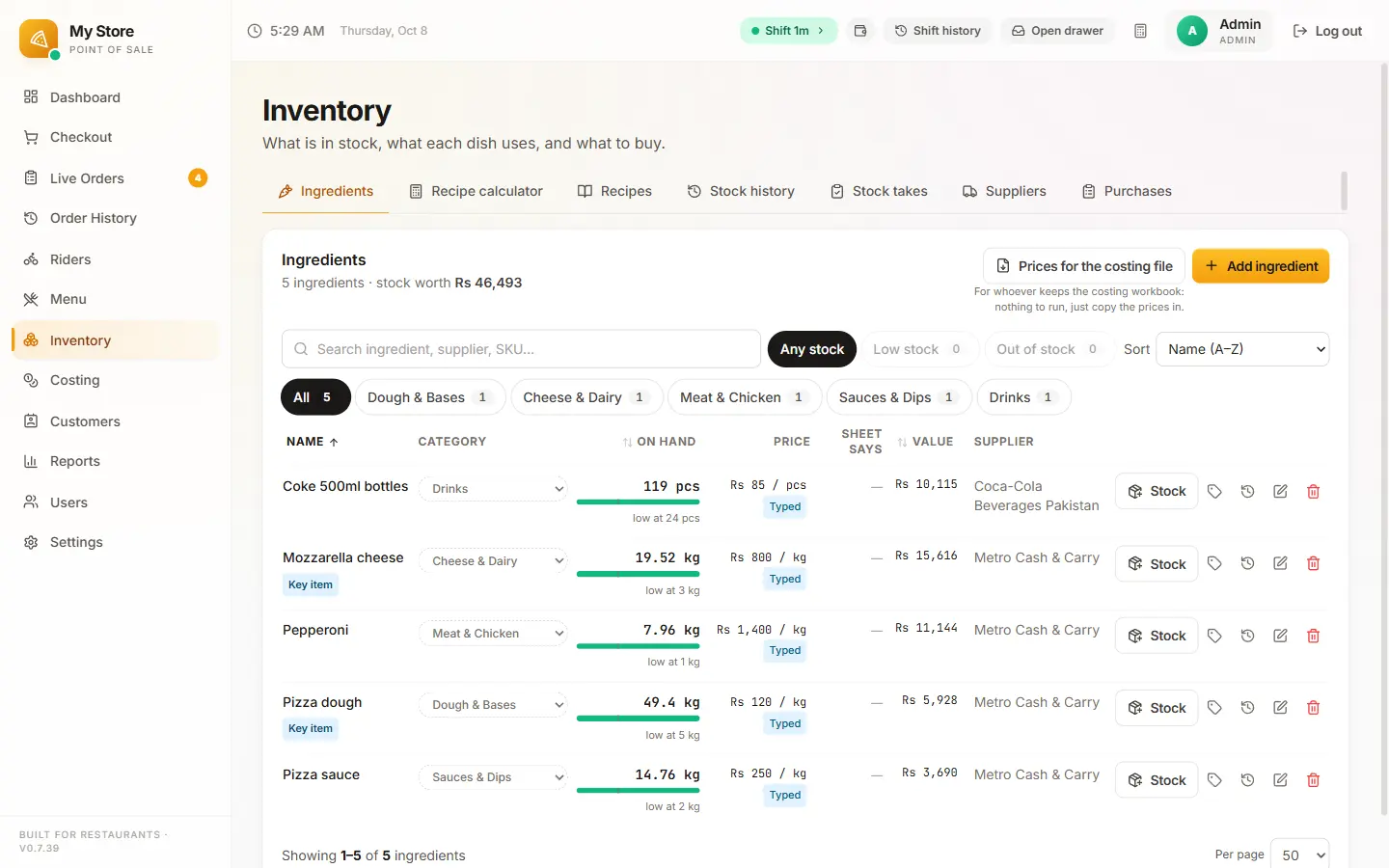
01/09Take the order
What Pixel & Oak POS does today
Everything below is in the product now and used every day at a working restaurant counter. What is still being built is listed separately, further down, under "Coming next".
Works with the internet off
Billing, kitchen tickets, receipts, the cash drawer, shift close and reports all run on the counter PC. Website orders and backups catch up by themselves when the line comes back.
Fast counter billing
Search the menu as you type, sizes and add-ons, order notes that print for the kitchen, and takeaway, delivery or Foodpanda in one tap. Built to be learned in a single shift.
Kitchen and receipt printing
80 mm or 58 mm thermal printers over USB or Wi-Fi, a kitchen ticket when the order is sent, the receipt when it is paid. A failed print never blocks the sale; it retries.
Delivery riders and areas
Delivery areas with their own charges, your riders or outside riders, a live orders board, and the cash each rider owes settled when they get back.
Card, cash and wallets
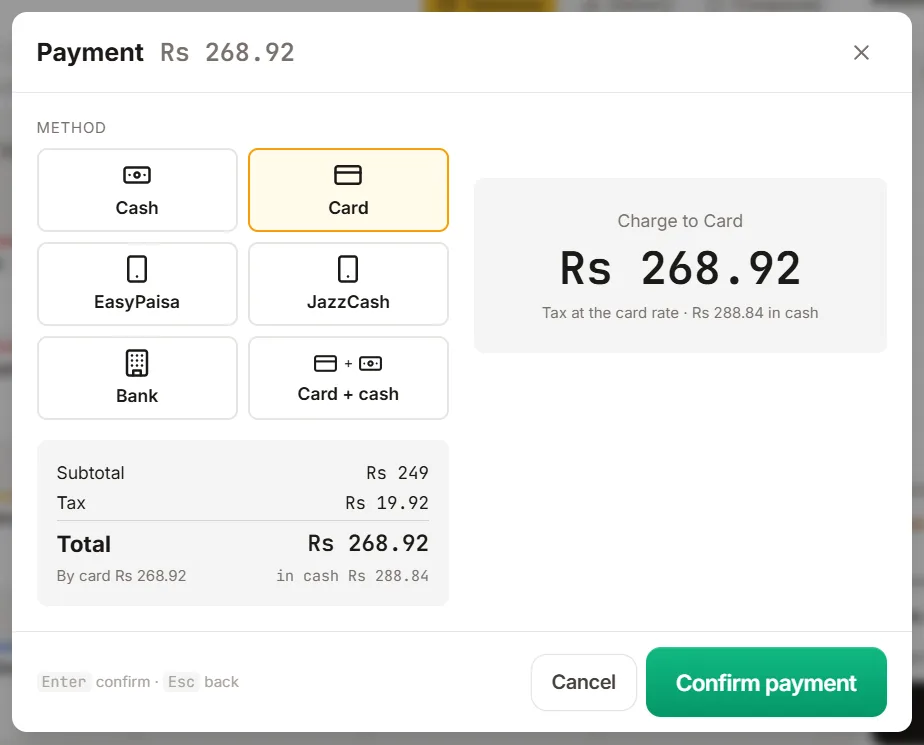
Cash, card, EasyPaisa, JazzCash and bank transfer, or part card and part cash on one bill. Set separate cash and card tax rates, as Sindh charges (for example 15% cash, 8% card).
Deals and discounts
Value deals, Buy 1 Get 1, automatic offers and a website-only discount, with a manager PIN needed above the limit you set. Deals never get double-discounted.
Inventory and recipes
Every sale takes its ingredients off stock by recipe. Purchases received at the bill price, waste, stock counts and low-stock warnings.
Food cost and profit
Food-cost percentage per menu item, menu costing and a recipe calculator that answers "how much do I need for 10 pizzas?"
Shifts and cash control
Opening float, cash in and out, a log of every time the drawer opens, a count by notes at close, and a shift report printed on the spot.
Reports that answer questions
Sales by day and hour, best sellers, how orders came in (walk-in, phone, WhatsApp, website, Foodpanda), discounts by staff, refunds, Foodpanda commission checks and CSV export.
Customers and phone orders
Find a regular by phone number with their saved addresses and past orders. Export the list or remove a person whenever you need to.
Staff roles and an audit trail
Owner, manager and cashier logins with PINs, a manager PIN for cancels and big discounts, and a tamper-evident log of every change.
Backups and automatic updates
A daily backup on the PC, a cloud copy, an optional second copy in a USB or Google Drive folder, and updates that install themselves.
Cash drawer your way
The drawer opens on every sale so card slips go in with the cash, or on cash sales only. Refunds and payouts open it for cash only.
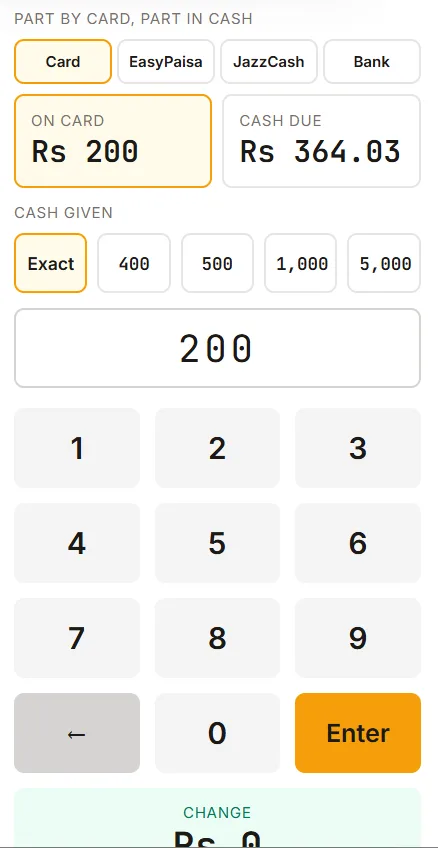
Card, cash or both on one bill, with the right tax
Sindh charges a restaurant’s bill one sales-tax rate when it is paid in cash and a lower rate when it is paid by card. Set both rates once and Pay does the rest.
- Card, EasyPaisa, JazzCash and bank are charged the card price.
- Card + cash: type the card amount and the till works out the cash due.
- The receipt prints the tax at each rate, and Reports show how much was at the card rate.
Want to see it on a real order? Book a 15-minute demo on WhatsApp. No sign-up, no card.
Book a free demo →Your own ordering website, with 0% commission
From the Pro plan, your restaurant gets its own ordering website. Customers order from you directly, the order prints in your kitchen, and you keep the full value of the order instead of paying an app 25–35%.
- Your restaurant’s own ordering website, on your own domain
- 0% commission and no limit on orders
- Change a price on the till and the website changes with it
- Orders arrive at the till and print in the kitchen automatically
- Pick-up and delivery with your delivery areas and charges, and a map pin from the customer
- Live order tracking for the customer
- An online-only discount to move regulars off delivery apps
- Fast pages for each delivery area, so you show up when people search nearby
- Pause online orders from the till when the kitchen is full
Only need a website? Start from our free restaurant website template, or read how we approach restaurant website design.
Ads and marketing, done for you
On the Business plan we market the restaurant for you, so the website and the till have orders to take.
Google Business Profile
Set up, verified and kept fresh: hours, menu, real photos and regular posts. We never buy or reward reviews.
Facebook and Instagram ads
The Meta Pixel on your website, campaigns built around your deals, and monthly tuning. Ad spend is paid by you, straight to Meta.
WhatsApp Business
Catalog plus instant replies for the menu, hours, location and how to order, and the same on your Facebook and Instagram inbox.
Content every month
One short promo video and four post designs for Facebook, Instagram and WhatsApp Status, made from your own food.
Menus and flyers
Printed menu and flyer design with a QR code that opens your ordering website.
POS software price: plans from Rs 2,499 a month
One flat monthly price per restaurant. No commission, no order caps and no setup fee during launch.
Outside Pakistan: the same plans, billed in US dollars.
Starter
One counter, everything you need to bill, print and close the day.
Rs 2,499 /month
- 1 till on your Windows PC
- Billing, kitchen tickets and receipts
- Takeaway, delivery and Foodpanda orders
- Cash, card, EasyPaisa, JazzCash; card + cash on one bill
- Deals, Buy 1 Get 1 and manager-approved discounts
- Shifts, drawer log and shift report
- Sales reports and CSV export
- Daily backups and automatic updates
- WhatsApp support
Pro
Your counter plus your own commission-free ordering website.
Rs 4,999 /month
- Everything in Starter
- 2 tills
- Your own online ordering website, 0% commission, no order limit
- Website orders print at the till automatically
- Inventory, recipes and food cost
- Riders, delivery areas and cash settlement
- Customer list with addresses and order history
- Cloud backup
- Setup and menu entry done for you
Business
The full suite: POS, website and ads done for you.
Rs 9,999 /month
- Everything in Pro
- Google Business Profile set up and kept fresh
- Facebook and Instagram ads run for you (ad spend paid to Meta)
- Meta Pixel and order tracking on your website
- WhatsApp Business catalog and instant replies
- 1 promo video + 4 post designs every month
- Your own domain, e.g. yourrestaurant.pk
- Priority WhatsApp support
- No setup fee during launch
- No commission, no order caps
- Month to month, cancel any time
- 30-day free trial on your own PC
- Pay yearly and get 2 months free
Pixel & Oak POS vs a typical POS and the delivery apps
What a Pakistani restaurant usually pays and gets, side by side.
| Feature | Pixel & Oak POS | Typical POS in Pakistan | Delivery apps |
|---|---|---|---|
| Monthly price | From Rs 2,499 | Rs 2,500 – 10,000 per branch | No fee, commission instead |
| Commission on orders | 0% | 1 – 3% of sales on some plans | About 25 – 35% of each order |
| Order caps | None | 100 – 450 orders a month on some plans | None |
| Setup fee | Free during launch | Rs 15,000 – 50,000 at some vendors | — |
| Works with the internet off | Everything | Partly, on most cloud POS | No |
| Your own ordering website | Included from Pro | Often a paid add-on | No — you are listed in their app |
| Delivery riders and cash settlement | Included | Add-on or missing | Their riders |
| Inventory and recipe costing | Included from Pro | Often on higher plans | No |
| Your customers’ phone numbers | Stay with you | Usually with you | Stay with the app |
Typical POS: published prices of eight Pakistani POS vendors, checked October 2026. Delivery apps: the commission Pakistani restaurants report paying per order.
Why restaurants switch to Pixel & Oak POS
Keep the 25–35% delivery apps take
Every order that comes through your own website keeps the commission an app would take, and your customers’ phone numbers stay in your POS.
No percentage on top of the monthly fee
The price is the price. POS and online ordering are one product, not a paid add-on kept for the top plan.
Priced in rupees for Pakistani restaurants
Not dollar pricing per branch. It runs on the Windows PC and 80 mm printer you already own.
Really works offline
Checkout, printing, shift close and reports keep going with the internet off and the power on a UPS — not "partly offline".
Nothing locked behind add-ons
No order caps and no setup fee during launch. Recipes, riders, cash reconciliation and the audit log are in the price.
AI, and what we are building next
None of this is in the product yet. We are building it with our first restaurants, so tell us at your demo which of these would save you the most time.
AI menu setup
Photograph your printed menu and the till builds your items, sizes, prices and deals.
AI daily brief on WhatsApp
Yesterday’s sales, what sold and what didn’t, and the one thing to fix today, sent to the owner every morning.
AI prep forecast
How much dough, chicken and fries to prepare tomorrow, worked out from your own sales history.
AI stock reorder
Suggested purchase orders when ingredients run low, sent to your supplier on WhatsApp.
AI WhatsApp ordering
An assistant that takes orders on WhatsApp in English or Roman Urdu and sends them straight to the till.
AI promo creator
Posts and short videos made from your own menu photos, ready for Facebook, Instagram and WhatsApp Status.
Also on the roadmap
- Kitchen display screen (KDS)
- Owner app: live sales on your phone
- FBR and SRB e-invoicing (certification pending)
- Online payments: Raast QR, cards, EasyPaisa and JazzCash
- Foodpanda orders straight into the till
- Loyalty points and WhatsApp offers for regulars
- Multi-branch dashboard with synced tills
- Urdu screens
- Dine-in tables and QR ordering at the table
- Barcode scanning for bakeries and marts
How to get started
Free demo
15 minutes on a WhatsApp video call, or at your restaurant if you are in Karachi.
We set it up
Your menu, printers, cash drawer, delivery areas and website — at no setup cost during launch.
Train your team
About an hour with your cashiers. The screens are built to be learned in one shift.
Go live
We watch the first week with you and stay one WhatsApp message away after that.
What hardware do you need?
Usually nothing new. Pixel & Oak POS runs on the counter equipment most Pakistani restaurants already have.
A Windows PC
Windows 10 or 11: a desktop, a laptop or an all-in-one touch POS terminal.
A thermal printer
Any 80 mm or 58 mm ESC/POS receipt printer over USB or Wi-Fi / LAN. Add a second one for the kitchen if you like.
A cash drawer
One that plugs into the printer’s drawer port. Pin and pulse are set in Settings, so most drawers just work.
Internet (optional)
Only for website orders, cloud backup and updates. The counter keeps working without it.
No hardware yet? We can source a complete counter kit for you: touch PC, printer and cash drawer.
Questions restaurant owners ask
How much does POS software cost in Pakistan?
Restaurant POS software in Pakistan usually costs Rs 2,500 to Rs 10,000 a month per branch, often with a percentage of sales, an order cap or a Rs 15,000 to 50,000 setup fee on top. Pixel & Oak POS starts at Rs 2,499 a month (Rs 4,999 with your own ordering website), with no commission, no order cap and no setup fee during launch.
What is the best POS software for restaurants in Pakistan?
It depends on how you sell. For delivery and takeaway restaurants that need a POS that works offline, handles riders and cash, and comes with a commission-free ordering website, Pixel & Oak POS is built for exactly that. If you need tablets at every table or a kitchen display today, choose a cloud POS that already has them; both are on our roadmap.
Does Pixel & Oak POS work without internet?
Yes. Billing, kitchen tickets, receipts, the cash drawer, shift close and reports all run on the counter PC with the internet off. Website orders, cloud backups and updates catch up automatically when the connection returns.
Do you take a commission on online orders?
No. Your ordering website charges 0% commission and has no order limit on any plan. You pay the monthly fee and keep the full value of every order, instead of the 25–35% a delivery app takes.
Is Pixel & Oak POS FBR integrated?
FBR Digital Invoicing support is built into the POS but is not certified yet, so we do not call it FBR compliant. If your business must issue FBR invoices today, tell us at the demo. Sindh restaurants can already set separate cash and card tax rates, and receipts print the tax at each rate.
Can customers pay part by card and part in cash?
Yes. Pay has a Card + cash button: type what goes on the card and the till works out the cash due. With a card tax rate set, the card part is taxed at the card rate and the cash part at the cash rate, and the receipt shows both.
How do I set different tax rates for cash and card payments?
Open Menu, then Tax, tap the pencil on your tax and fill in "When paid by card, wallet or bank". For a Sindh restaurant that is 15% for cash and 8% for card. Leave it empty and every bill uses the same rate however it is paid.
What hardware do I need?
A Windows 10 or 11 PC or laptop, an 80 mm or 58 mm thermal receipt printer and, if you want one, a cash drawer that plugs into the printer. Most restaurants already have this. If you don’t, we can source a complete counter kit for you.
Does it handle delivery riders and Foodpanda orders?
Yes. Set delivery areas with their own charges, assign your own or outside riders, follow orders on the live board and settle the cash each rider brings back. Foodpanda orders are rung on the till with their commission and payout checked; automatic import is on the roadmap.
Does it include inventory and recipe costing?
Yes, from the Pro plan. Each sale takes its ingredients off stock by recipe, and you get purchases, waste, stock counts, low-stock warnings, food-cost percentage per item and a recipe calculator.
Is there a free trial?
Yes. Every till starts with a 30-day free trial on your own PC, with all features on. After that you choose a plan, and you can stop any time.
Can you move my menu from my current POS or a printed menu?
Yes. Send us your menu as a photo, a PDF or a spreadsheet, and we enter the items, sizes, add-ons, deals and prices for you as part of setup.
Who owns my data, and is it backed up?
You do. Your orders and customer list live on your own PC, with a daily backup, a cloud copy and an optional second copy in a folder you choose. You can export your customer list any time, and we never sell or share it.
Does it run on Android, and is there an Urdu version?
Not yet. The till runs on Windows today, which is what most Pakistani counters already use. An owner app for your phone and Urdu screens are on the roadmap.
Can I use Pixel & Oak POS outside Pakistan?
Yes. The same POS, ordering website and marketing suite is available worldwide, priced in US dollars: $15 a month for Starter, $29 for Pro and $69 for Business.
Related
Free restaurant website template
A real HTML menu, reservations and open/closed status, free to use.
Open →Restaurant website design
What a restaurant website needs to turn visitors into orders.
Open →Free website tools
Speed test, SEO checker and cost calculators. No sign-up.
Open →Our work
Real websites we have built, with screenshots and results.
Open →See Pixel & Oak POS on a real order
A free 15-minute demo on WhatsApp: no sign-up, no card, no obligation. When you are ready, every till starts with a 30-day free trial.