Still typing WhatsApp orders into your till?
A WhatsApp ordering system lets customers order inside WhatsApp, on your own number: they pick from your menu with buttons, answer the choices the kitchen needs, give their area and address, see the exact total and confirm. The order then lands on your POS till by itself, so nobody copies it from the chat. Pixel & Oak's has run at a restaurant in Karachi since 26 October 2026, and it is coming to Pixel & Oak POS: from December 2026 in Pakistan, with English for US restaurants after that.
- Orders inside WhatsApp
- Lands on your till by itself
- Updates sent for you
- Staff keep the WhatsApp Business app
- Menu with photos in WhatsApp
Prefer email? [email protected] · we reply within 24 hours.
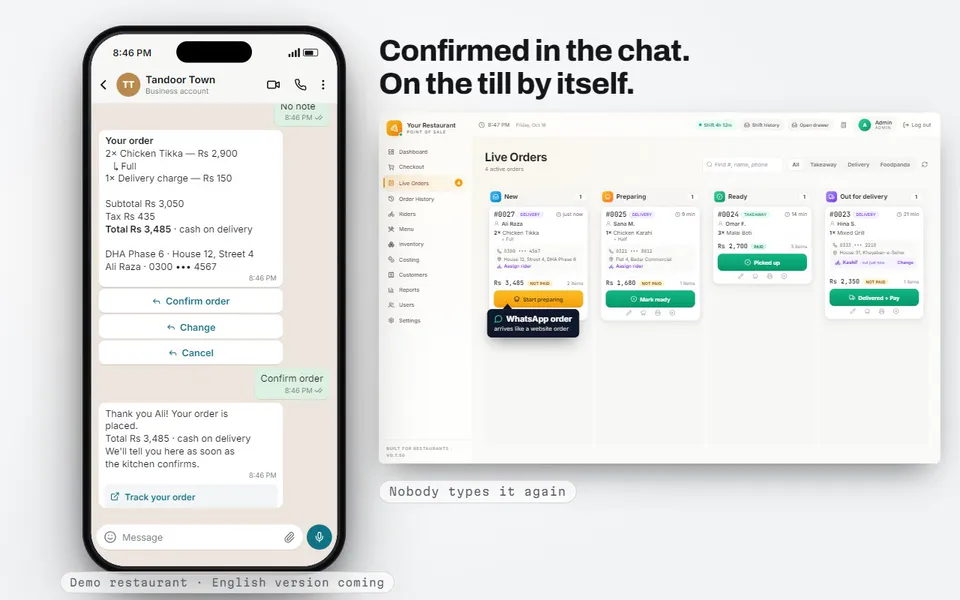
Where it runs today
Live at one restaurant in Karachi since 26 October 2026, on that restaurant's own WhatsApp number. For Pixel & Oak POS clients it is coming: from December 2026 in Pakistan, with English for US restaurants after that. Join early access and we set it up with you, on your number.
The problem: every WhatsApp order is typed twice
Your customer types the order into WhatsApp. Then someone at the counter reads it, scrolls back for the address, asks "half or full?", waits for the answer and types the whole thing into the till again. On a busy night that is dozens of chats open at once, and "bhai menu bhej do" over and over.
Every retyped order is a chance to get the size, the address or the phone number wrong, and a chat that scrolls out of sight while you are busy is an order nobody started.
- The customer already wrote the order. You write it again.
- The address is somewhere up the chat. Scroll, copy, check.
- The menu gets sent by hand, many times a day.
- The customer waits for a reply while you serve the counter.
How it works: the order happens inside WhatsApp
The customer messages your WhatsApp number. The bot answers with buttons: order here, your website, or a person. Then it walks them through the order with WhatsApp lists and buttons: no typing, no app to install.
- Your menu in lists, straight from the menu on your till.
- The choices the kitchen needs: size, flavour, how many. Choices you marked as required must be picked.
- Delivery or pick-up, the customer's area from your own delivery areas, the address and the name.
- The exact total with tax and delivery, worked out by the same system as your ordering website, then Confirm order.
Confirmed in the chat, on your till by itself

When the customer taps Confirm order, the order lands on the till exactly like an order from your own ordering website, with the note "WhatsApp order". The kitchen ticket and the bill print by themselves, as they do for every website order. Nobody types it.

Payment is cash on delivery or at pick-up. The customer gets a link to follow the order.

Watch it: from the chat to the till
The whole flow in about a minute, with a demo restaurant and no sound needed.
The updates go out by themselves
As the till moves the order along, the customer hears about it on WhatsApp without anyone typing a message:
- Kitchen got it: when the till accepts the order.
- Ready (pick-up) or out for delivery (when the rider leaves).
- Delivered, with a thank-you that asks for a Google review.
Your staff stay in charge

The bot never locks your staff out. Your number stays on the WhatsApp Business app on the shop's phone (Meta calls this "coexistence"). A customer can type staff at any step to reach a person; when staff reply from the app, the bot stays out of that chat for an hour. After hours, the first message of the day gets one reply with your opening hours and the customer's own order link, name and number filled in.
Also in the box
Your menu with photos inside WhatsApp
A WhatsApp catalog fed from your till's menu every hour. Customers fill the WhatsApp cart and send it; the bot asks the required choices and the order goes to the till.
Owner dashboard on your phone
Chats per day, which Click-to-WhatsApp ad started each chat, who bought afterwards, and the bot messages used against Meta's free 1,000 a month. It stores who and when, never what people wrote.
Comment replies
A question under your Facebook or Instagram posts gets one reply pointing to WhatsApp. Obvious scam comments are hidden, never deleted.
Till sales to Meta
Sales from the till go to Meta as store purchases (the phone number is hashed), so your ads can be measured and aimed at real buyers.
Words customers can always use
menu starts again, staff reaches a person, cancel stops the order. Anything else typed outside an order is left for your staff.
Roman Urdu today
The bot speaks Roman Urdu, the way customers in Pakistan chat. An English version is planned for restaurants outside Pakistan.
Typing WhatsApp orders by hand vs WhatsApp ordering
| Step | WhatsApp ordering | Typing orders by hand |
|---|---|---|
| Sending the menu | The bot sends it as a list the moment they ask | Someone sends a photo or a PDF, again and again |
| Size, flavour, quantity | Asked by the bot; required choices must be picked | Asked by a person, answers come back later in the chat |
| Address and area | Area from your list, then the address, in order | Scrolled for and copied out of the chat |
| The total | Worked out from your menu, tax and delivery charge | Worked out at the counter, then typed back |
| Getting it on the till | Lands on the till as a "WhatsApp order" by itself | Typed into the till by the cashier |
| Order updates | Kitchen got it, out for delivery, delivered: sent by themselves | Typed one by one, if anyone has time |
What you need (the honest list)
WhatsApp ordering runs on Meta's official WhatsApp Cloud API, on your own number. That comes with a few requirements from Meta, and they are yours, not ours:
-
Your own WhatsApp Business number
The number your customers already message. It stays on the WhatsApp Business app on the shop's phone, so your staff keep replying from it. Meta asks that the phone app is opened at least every two weeks.
-
A verified Meta business
A Facebook (Meta) business account that has passed Meta's business verification. We help you through it.
-
Meta's message fees
Meta gives each number 1,000 free service messages a month. After that Meta charges per message and needs a payment method on your WhatsApp account. One order through the bot uses about 15–18 messages, so roughly 55–65 bot orders a month fit in the free messages. Meta's prices can change; we check them with you at setup.
-
Pixel & Oak POS with your own ordering website
The bot places orders through your Pixel & Oak ordering website, and they print on the Pixel & Oak POS till (Windows 10 or 11). Ask us which plan includes WhatsApp ordering when early access opens.
What Pixel & Oak POS costs
One flat monthly price per restaurant, with no commission, plus a one-time setup fee from $49 after the 30-day free trial (free on yearly plans). Prices in US dollars; in Pakistan the same plans are priced in rupees, with a one-time Rs 14,999 setup fee, paid after the 30-day trial.
Starter · $25/month
One till: billing, kitchen tickets, receipts, deals, shifts, reports and daily backups.
Pro · $45/month
Two tills, your own 0%-commission ordering website, inventory, riders and set-up done for you.
Business · $199/month
Everything in Pro, plus your Google profile, Meta ads, WhatsApp replies and monthly promo content.
Compare the plans in full · Prices in Pakistan: from Rs 2,499
Questions about WhatsApp ordering
What is a WhatsApp ordering system for restaurants?
It lets customers order inside WhatsApp instead of typing a free-form message: the restaurant's number answers with the menu as lists and buttons, asks the choices the kitchen needs, takes the address and shows the total. Pixel & Oak's version then puts the confirmed order on the POS till by itself.
How do I get WhatsApp orders into my POS without typing them?
With WhatsApp ordering, the customer builds and confirms the order in the chat, and it lands on the Pixel & Oak POS till like a website order, noted "WhatsApp order", with the ticket printing by itself. Nobody copies it from the chat.
Can my staff keep using the WhatsApp Business app?
Yes, on the shop's phone. Your number stays on the WhatsApp Business app (Meta calls it coexistence). Customers can type "staff" to reach a person, and when staff reply from the app the bot stays out of that chat for an hour. WhatsApp on a computer may not stay linked; we check that with you at setup.
Is it an AI chatbot?
No. It is a menu bot: customers tap lists and buttons, so the order is always in a shape the till understands. Words typed outside an order are left for your staff, and "menu", "staff" and "cancel" always work.
How much does WhatsApp charge?
Meta gives each WhatsApp Business number 1,000 free service messages a month. After that Meta charges per message and needs a payment method on the account. One order through the bot uses about 15–18 messages, roughly 55–65 orders a month inside the free messages. Meta sets and changes these prices.
Can customers see the menu with photos inside WhatsApp?
Yes. A WhatsApp catalog is filled from your till's menu every hour. Customers add items to the WhatsApp cart and send it, and the bot asks the required choices before the order goes to the till.
What happens when the restaurant is closed?
The first message of the day gets one reply with your opening hours and the customer's own order link, with their name and number filled in, so they can order when you open.
Do customers pay online?
No. WhatsApp orders are cash on delivery or paid at pick-up, the same as orders on the Pixel & Oak ordering website today.
Which language does the bot speak?
Roman Urdu today, the way customers in Pakistan write on WhatsApp. An English version is planned for restaurants outside Pakistan.
Can I use it today?
It has been live at a restaurant in Karachi since 26 October 2026. For Pixel & Oak POS clients it is coming: from December 2026 in Pakistan, with English for US restaurants after that. Message us on WhatsApp to join early access.
Keep reading
Pixel & Oak POS: the full product page
Every feature, the three plans, the comparison and the roadmap.
Open →Restaurant online ordering system
Your own ordering website with 0% commission: menu from the till, orders printed in the kitchen, pick-up and delivery.
Read the guide →Delivery POS system
Delivery areas and charges, a live order board, your own or outside drivers, and the cash each one owes settled when they get back.
Read the guide →Pizza POS system
Sizes, crusts and toppings in two taps, deals and Buy 1 Get 1, oven tickets, drivers, and food cost per pizza.
Read the guide →Pixel & Oak POS in Pakistan
The same plans priced in rupees, from Rs 2,499 a month, with a free demo at your counter in Karachi.
Open →Stop typing WhatsApp orders
WhatsApp ordering is coming to Pixel & Oak POS: from December 2026 in Pakistan, with English for US restaurants after that. Join early access and we set it up on your own number with you.