Delivery POS system for restaurants that run their own drivers
A delivery POS takes the order with the customer’s address, adds the right delivery charge, sends the ticket to the kitchen, follows every order to the door and settles the cash each driver brings back. Pixel & Oak POS does all of that on one Windows till, built at a pizza delivery restaurant, with your own 0%-commission ordering website feeding the same board. From $15 a month.
- Area delivery charges
- Live order board
- Your own or outside drivers
- Driver cash settlement
- Works offline
Prefer email? [email protected] · we reply within 24 hours.
Where it runs today
Pixel & Oak POS runs every day at a restaurant in Karachi, and the till, the receipts and the ordering website show prices in Pakistani rupees. Your own currency, prices with tax included, your time zone and your phone format are next on the roadmap. Outside Pakistan you can see a full demo now and join early access: we set up the first restaurants in each country ourselves, at the launch price.
One delivery order, start to finish
How an order moves through the till at the restaurant it was built for.
Phone or website order
Type the caller’s number and a regular comes up with their saved addresses. Website orders arrive by themselves.
Area and charge
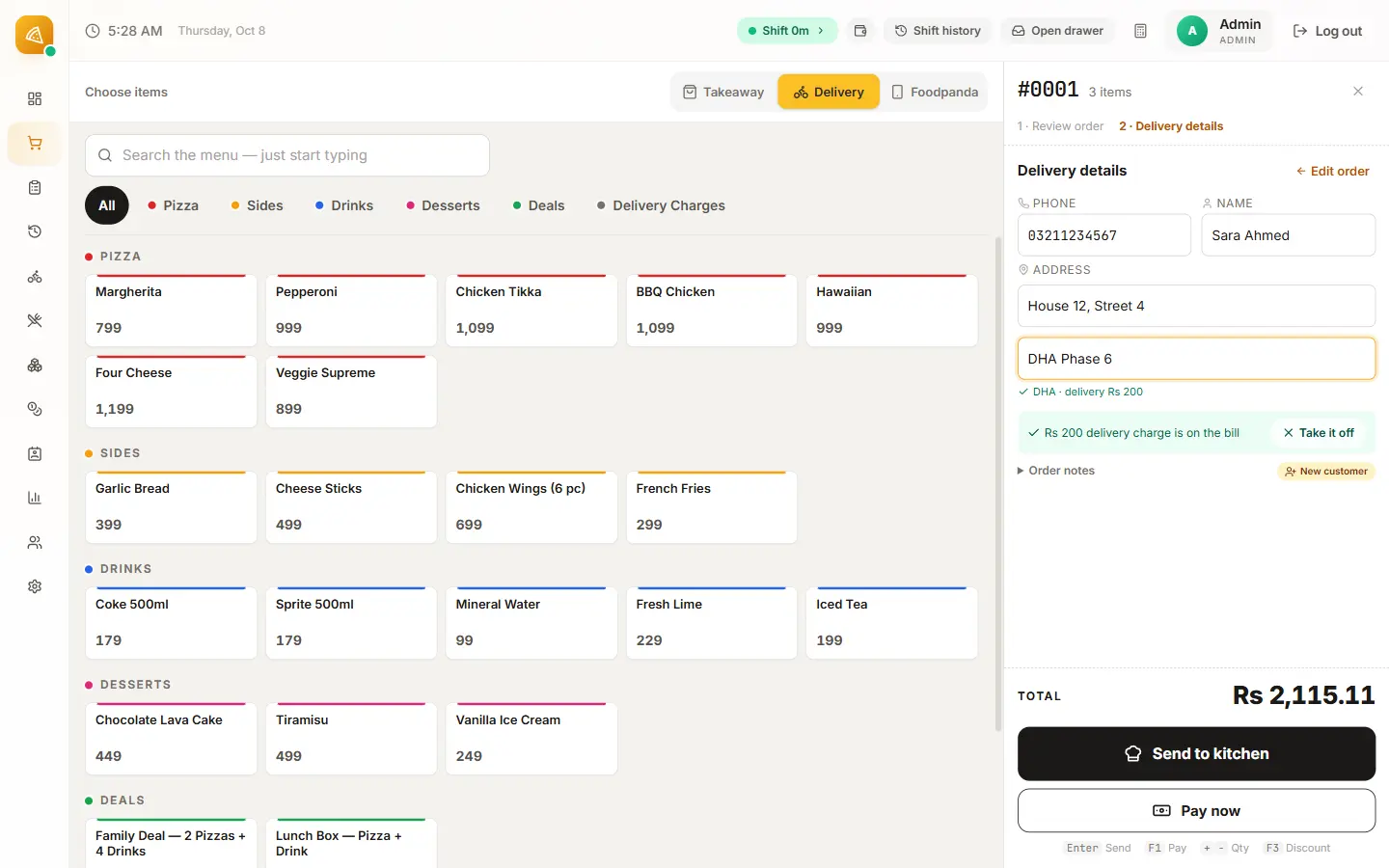
Pick the customer’s area and its delivery charge goes on the bill. Discounts never touch the delivery charge.
Kitchen ticket
Sending the order prints the kitchen ticket, notes and allergy notes included.
Live board
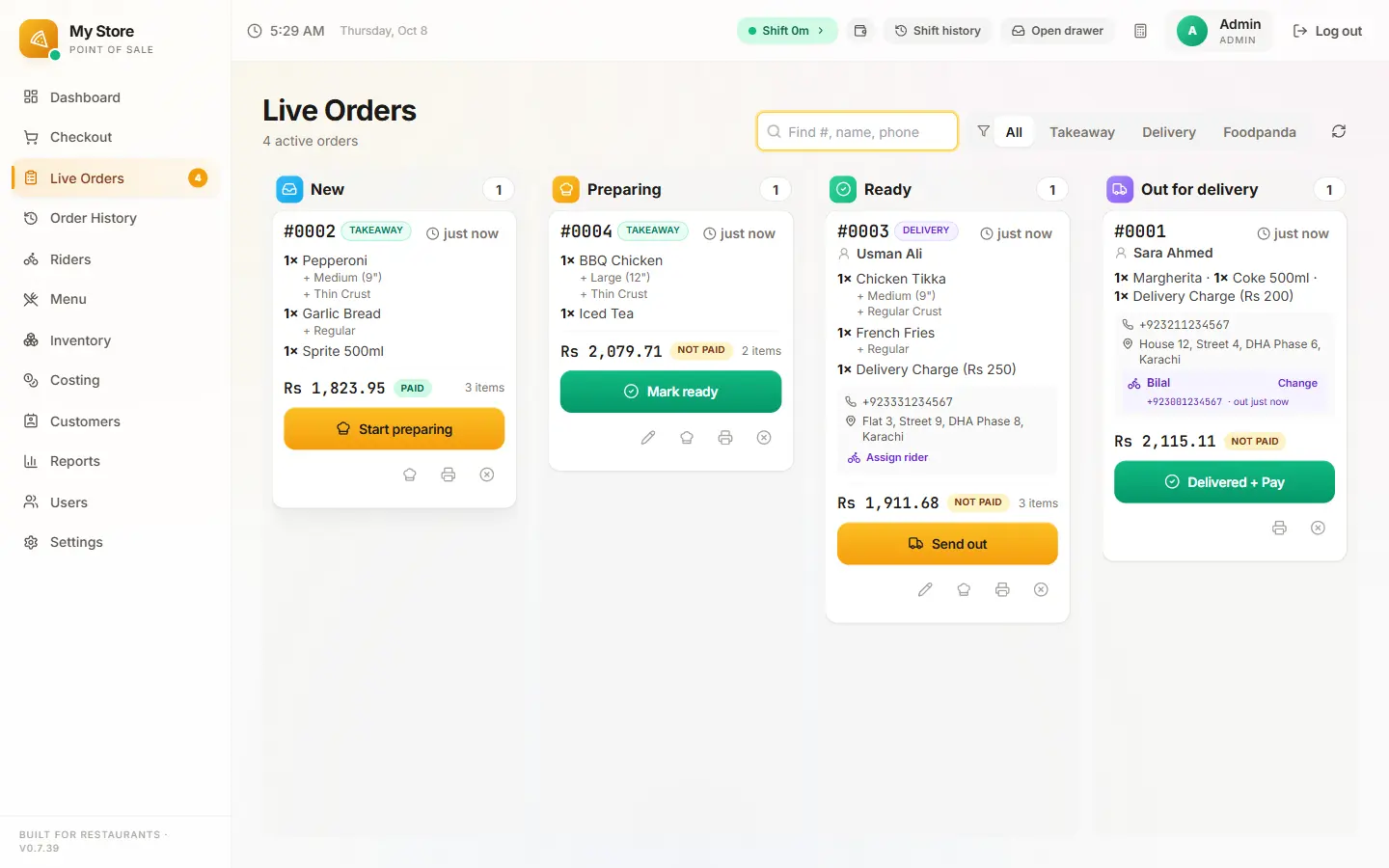
The order moves across New, Preparing, Ready and Out for delivery, where the whole team can see it.
Assign a driver
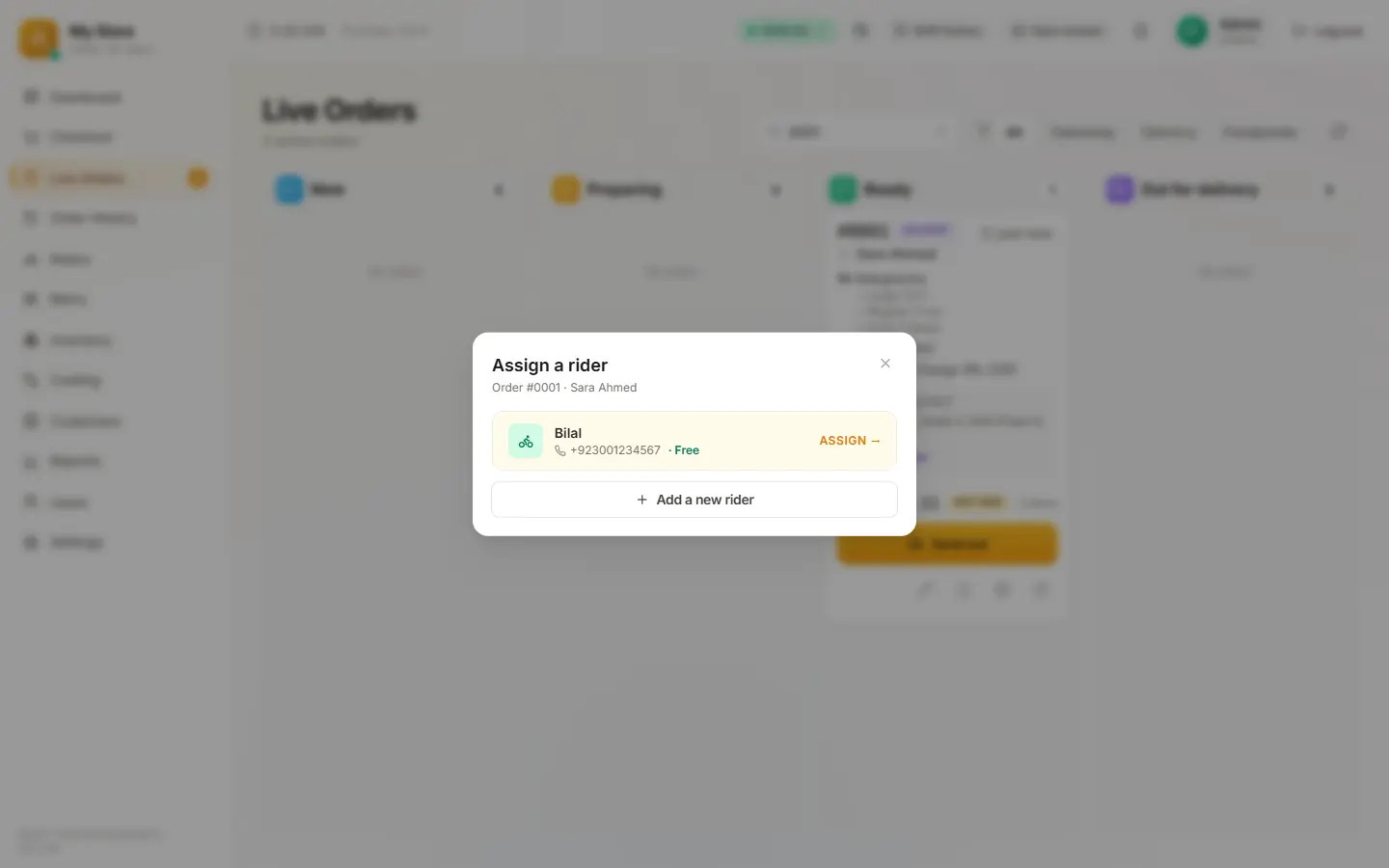
Pick one of your drivers, or send it with an outside driver, in one tap.
Settle the cash
When the driver gets back, the till shows what they owe and settles it, so the drawer adds up at close.
The delivery screens
From the restaurant it runs at, with a demo menu and made-up customers.
What delivery management software should do
-
Delivery charges per area
Set your areas once, each with its own charge. The names are yours, so neighbourhoods, blocks or postcode districts all work. The charge is added when the area is picked.
-
A board the whole team can read
New, Preparing, Ready and Out for delivery, with search by order number, name or phone.
-
Your drivers and outside drivers
Keep a list of your own drivers, or send an order out with an outside driver.
-
Driver cash
Each driver’s cash is tracked order by order and settled when they return, so the drawer and the drivers add up at close.
-
The delivery charge kept whole
Discounts come off the food, never off the delivery charge.
-
Exact location and tracking
On your own ordering website, customers can share their exact location from their phone, and follow their order’s progress on a tracking page.
-
Pause when the kitchen is full
One switch on the till pauses online orders until you are ready again.
Your own drivers, or the apps’ drivers?
The trade-off most delivery restaurants weigh, in plain terms.
| Question | Your own drivers and website | A delivery app and its drivers |
|---|---|---|
| What you pay per order | Your driver’s pay; 0% commission on website orders | About 15 – 35% of each order in commission |
| Who keeps the customer | You: phone number, address and order history | The app |
| Delivery area and charges | Yours to set | The app’s radius and fees |
| When it gets busy | Pause online orders from the till | Pause in the app’s tablet |
| What you need | Drivers, and a POS that tracks their cash | A tablet and an account |
Commission range: published US and UK delivery-app tiers, October 2026. Many restaurants run both: apps for new customers, their own website for regulars.
Why delivery is built into the till
Pixel & Oak POS started at a pizza delivery restaurant in Karachi where most orders go out the door: phone orders, WhatsApp orders, website orders and delivery-app orders, with the restaurant’s own riders on the road until late. The delivery screens exist because that counter needed them every night.
Running delivery from a pizza shop? The pizza POS guide covers sizes, deals and food cost. Want regulars to order direct? See the online ordering system.
What it costs
One flat monthly price per restaurant, with no commission and no setup fee during launch. Prices in US dollars; in Pakistan the same plans are priced in rupees.
Starter · $15/month
One till: billing, kitchen tickets, receipts, deals, shifts, reports and daily backups.
Pro · $29/month
Two tills, your own 0%-commission ordering website, inventory, riders and set-up done for you.
Business · $69/month
Everything in Pro, plus your Google profile, Meta ads, WhatsApp replies and monthly promo content.
Compare the plans in full · Prices in Pakistan: from Rs 2,499
Questions people ask
What is a delivery POS system?
A point-of-sale system that treats delivery as part of every order: the customer and their address, the delivery charge for their area, the kitchen ticket, a board that shows where each order is, driver assignment and the cash drivers collect. Pixel & Oak POS does all of this on one Windows till.
Can I track my drivers on a map?
Not with GPS. The board shows which driver has which order and when it went out, and the till settles each driver’s cash when they return. Customers who order on your own website can follow their order’s progress.
Does it work with outside or freelance drivers?
Yes. Send an order with an outside driver instead of one of your own, in the same one-tap dialog.
How are delivery charges set?
In Settings, under delivery areas and fees: add each area with its charge, using whatever names your customers know. When the cashier or the customer picks the area, its charge goes on the bill.
Does it work with DoorDash, Uber Eats or Deliveroo?
Not directly yet. Foodpanda, in Pakistan, is the only delivery app with its own order type on the till today, with its commission and payout checked. Orders from other apps stay on their own tablets for now; bringing them straight into the till is on the roadmap.
How much does delivery management software cost?
Pixel & Oak POS is $15 a month with delivery areas, drivers and the live board, and $29 a month with your own commission-free ordering website feeding the same board. There is no per-order fee and no setup fee during launch.
Can I use it outside Pakistan today?
You can see a full demo and join early access. The till runs every day at a restaurant in Karachi and shows prices in Pakistani rupees; your own currency, prices with tax included, your time zone and local phone formats are next on the roadmap, and we set up the first restaurants in each country ourselves at the launch price.
Keep reading
Pixel & Oak POS: the full product page
Every feature, the three plans, the comparison and the roadmap.
Open →Pizza POS system
Sizes, crusts and toppings in two taps, deals and Buy 1 Get 1, oven tickets, drivers, and food cost per pizza.
Read the guide →Restaurant online ordering system
Your own ordering website with 0% commission: menu from the till, orders printed in the kitchen, pick-up and delivery.
Read the guide →Takeaway EPOS system (UK)
A till for UK takeaways: collection and delivery, phone orders, kitchen tickets, driver cash-up and a commission-free ordering site.
Read the guide →Pixel & Oak POS in Pakistan
The same plans priced in rupees, from Rs 2,499 a month, with a free demo at your counter in Karachi.
Open →Watch a delivery order go out
A free 15-minute demo on a video call: from the phone call to the driver’s cash. Every till starts with a 30-day free trial.