Pizza POS system, built at a pizza delivery counter
A pizza POS has to take sizes, crusts, toppings and deals in a couple of taps, print a ticket the oven can read, and run delivery: areas, charges, drivers and the cash they bring back. Pixel & Oak POS was built inside a busy pizza delivery and takeaway shop and does all of that on a Windows PC, even offline, with a commission-free ordering website. From $15 a month.
- Sizes, crusts, toppings
- Deals and Buy 1 Get 1
- Delivery drivers
- Food cost per pizza
- Works offline
Prefer email? [email protected] · we reply within 24 hours.
Where it runs today
Pixel & Oak POS runs every day at a restaurant in Karachi, and the till, the receipts and the ordering website show prices in Pakistani rupees. Your own currency, prices with tax included, your time zone and your phone format are next on the roadmap. Outside Pakistan you can see a full demo now and join early access: we set up the first restaurants in each country ourselves, at the launch price.
What a pizza shop needs from its POS
A checklist from the counter it was built at. Every answer on the right is in the till today.
-
Sizes, crusts and toppings
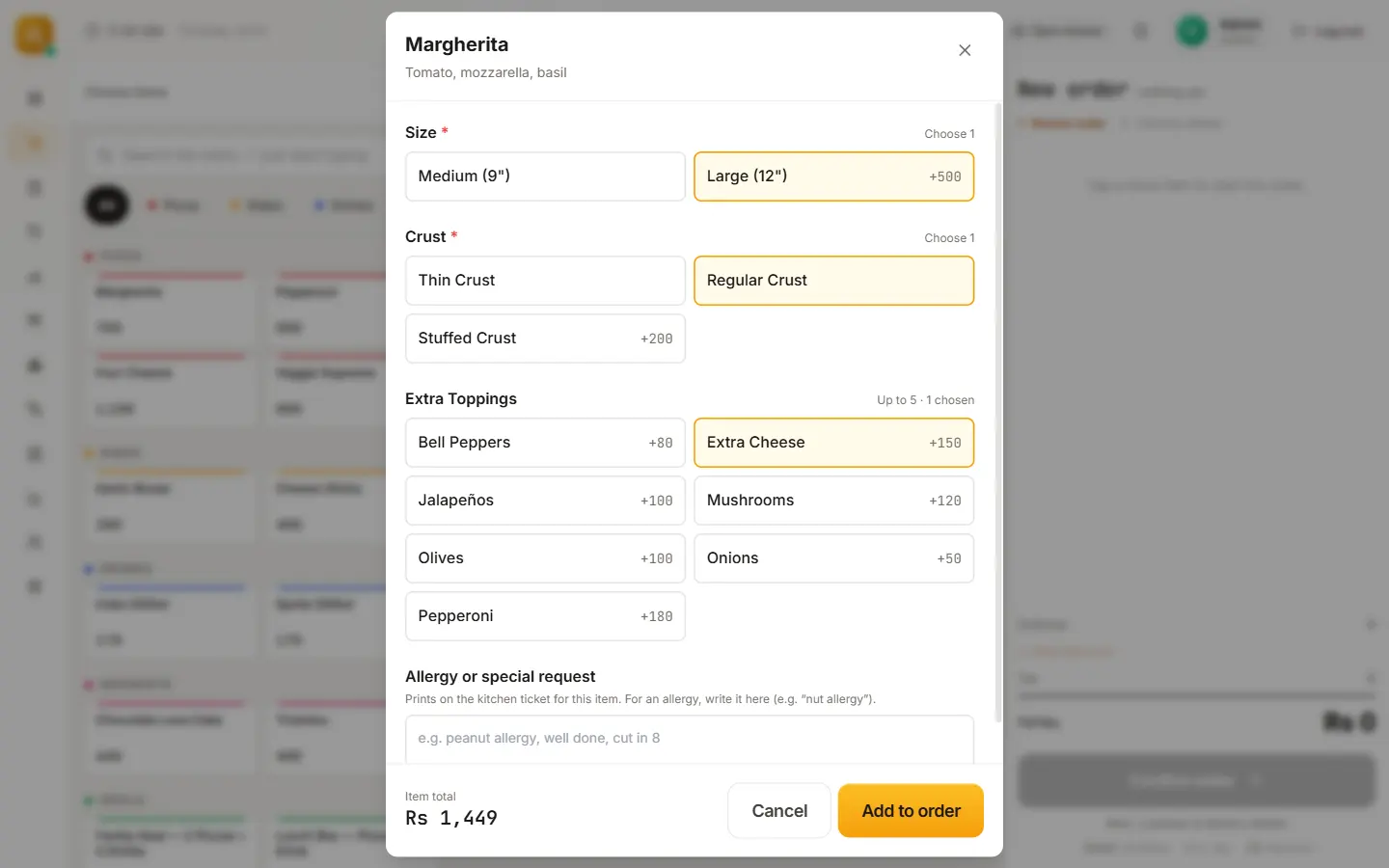
Size, crust and extra toppings are choices on the pizza, each with its own price, and each size keeps its own recipe so the right amount of dough and cheese comes off stock. Choices you mark as required have to be picked before the pizza goes on the order.
-
Deals and combos
Value deals (two pizzas and a drink, say), Buy 1 Get 1 and automatic offers. A deal is never discounted twice, and the pizzas inside a deal still take their own ingredients off stock.
-
Tickets the oven can read
Sending an order prints the kitchen ticket with every choice and note, allergy notes included. A failed print never blocks the sale; it retries.
-
Phone orders from regulars
Type the caller’s number and the regular comes up with their saved addresses and past orders.
-
Delivery areas and charges
Pick the customer’s area and its delivery charge goes on the bill by itself. Discounts never come off the delivery charge.
-
Drivers and their cash
Assign one of your drivers, or an outside driver, in one tap. The till tracks what each driver owes and settles it when they get back.
-
Online orders without commission
Your own ordering website (Pro plan) sends orders straight to the till and the kitchen printer, with 0% commission.
-
Food cost per pizza
Recipes take ingredients off stock with every sale, and each item shows its food-cost percentage. The recipe calculator answers "how much do I need for 10 large pizzas?"
A pizza order on the real till
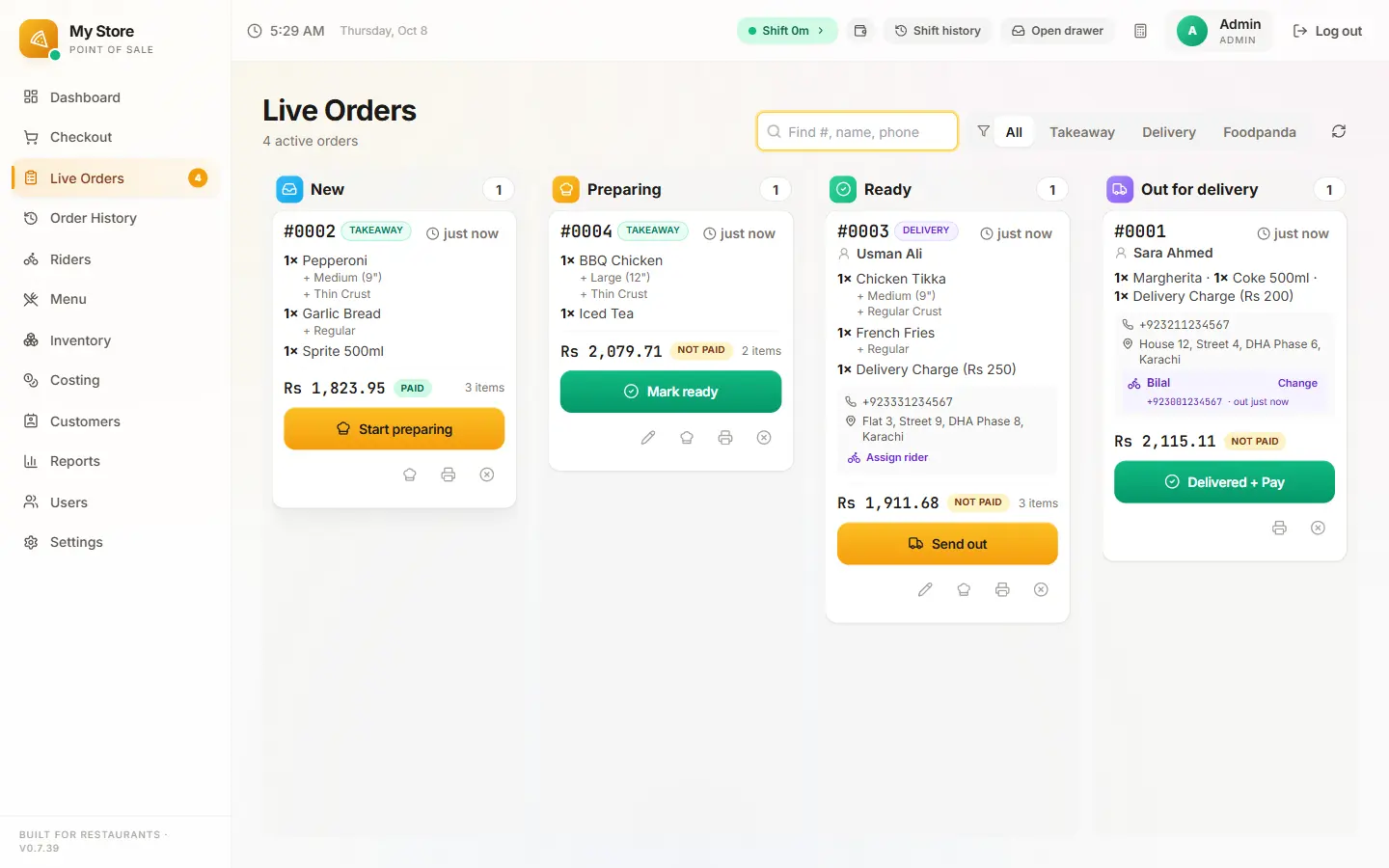
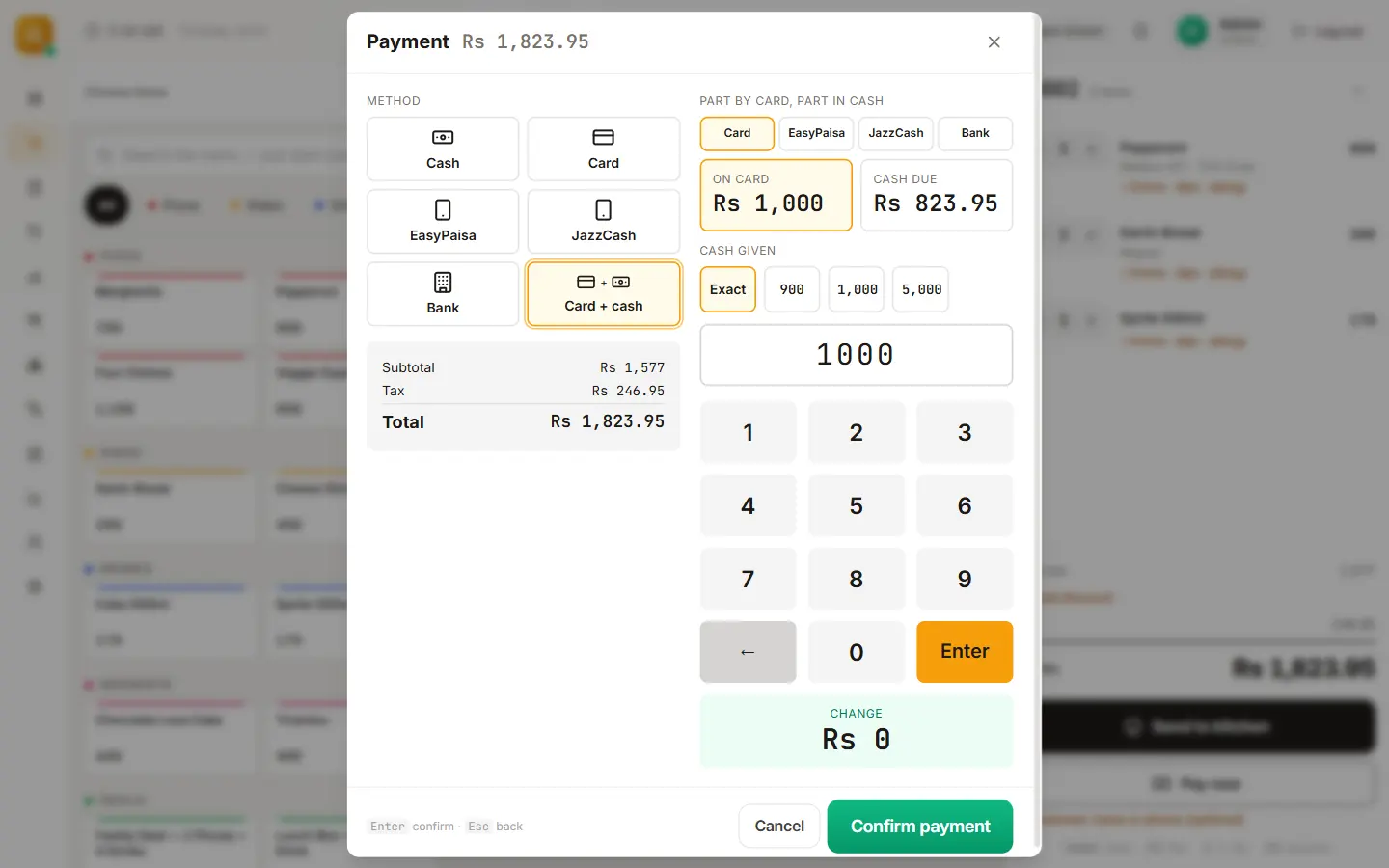
Screens from the counter it runs at, with a demo menu (prices there are in rupees).
Deals pizza customers expect, without maths at the counter
Buy 1 Get 1
Set it up once as a deal; the cashier rings it in one tap and the till prices it.
Value deals and combos
Two medium pizzas and a drink, a family box, a lunch deal: one button at a fixed price.
Automatic offers
Offers that apply by themselves when the order qualifies, so nobody forgets them in a rush.
Website-only discount
A discount that applies only on your own website, to move regulars off delivery apps.
Discount limits
Cashiers can give discounts up to the limit you set; above it, a manager types their PIN.
Never twice
A deal never gets a second discount on top, and the delivery charge is never discounted.
Pizza food cost calculator
What one pizza costs you to make, and what is left from the menu price. Type your own numbers, in any currency.
Delivery from a pizza counter
Most pizza shops live on delivery, so the till treats it as the main job, not an add-on: the customer’s area sets the delivery charge, the order moves across the live board from New to Out for delivery, and each driver’s cash is settled when they get back. The delivery POS guide walks through it step by step.
Orders from your own website land on the same board and print in the same kitchen, with no commission. See how the ordering website works.
What it costs
One flat monthly price per restaurant, with no commission and no setup fee during launch. Prices in US dollars; in Pakistan the same plans are priced in rupees.
Starter · $15/month
One till: billing, kitchen tickets, receipts, deals, shifts, reports and daily backups.
Pro · $29/month
Two tills, your own 0%-commission ordering website, inventory, riders and set-up done for you.
Business · $69/month
Everything in Pro, plus your Google profile, Meta ads, WhatsApp replies and monthly promo content.
Compare the plans in full · Prices in Pakistan: from Rs 2,499
Questions people ask
What is the best POS system for a pizza shop?
One that takes sizes, crusts and toppings in a couple of taps, handles deals without maths at the counter, prints clear kitchen tickets, runs delivery with drivers and cash settlement, and takes no commission on your online orders. Pixel & Oak POS was built at a pizza delivery shop for exactly that. If you need table service or a kitchen display screen today, pick a system that already has them; both are on our roadmap.
How much does a pizza POS system cost?
Cloud pizza and restaurant POS systems usually cost $0 to $149 a month per location, plus card processing when you have to use the vendor’s payments, and online ordering is often extra. Pixel & Oak POS is $15 a month, $29 with your own commission-free ordering website, or $69 with marketing done for you.
Can it do half-and-half pizzas?
Not yet. A pizza takes one set of choices today: size, crust and toppings. Half-and-half is on our list; until then, ring the pricier half and put the other half in the kitchen note, which prints on the ticket.
Can it handle pizza deals like Buy 1 Get 1 or two pizzas and a drink?
Yes. Buy 1 Get 1, value deals at a fixed price and automatic offers are all built in, with a manager PIN for discounts above the limit you set. A deal is never discounted twice.
Does it print a kitchen ticket for the oven?
Yes. Sending an order prints a kitchen ticket with every size, crust, topping and note, allergy notes included, on an 80 mm or 58 mm thermal printer. Add a second printer for the kitchen if the counter and the oven are apart.
Does it track food cost per pizza?
Yes, from the Pro plan. Each pizza’s recipe takes its ingredients off stock when it sells, every item shows its food-cost percentage, and the recipe calculator tells you how much dough, cheese and toppings a batch needs.
Can customers order pizza from my own website?
Yes, on the Pro plan: your own ordering website with 0% commission, for pick-up or delivery. The menu and prices come from the till, and each order prints in your kitchen automatically.
Will it keep working if the internet goes down on a Friday night?
Yes. Orders, kitchen tickets, receipts, the cash drawer and shift close all run on the counter PC. Website orders and backups catch up when the connection is back.
Can I use it outside Pakistan today?
You can see a full demo and join early access. The till runs every day at a restaurant in Karachi and shows prices in Pakistani rupees; your own currency, prices with tax included, your time zone and local phone formats are next on the roadmap, and we set up the first restaurants in each country ourselves at the launch price.
Keep reading
Pixel & Oak POS: the full product page
Every feature, the three plans, the comparison and the roadmap.
Open →Delivery POS system
Delivery areas and charges, a live order board, your own or outside drivers, and the cash each one owes settled when they get back.
Read the guide →Restaurant online ordering system
Your own ordering website with 0% commission: menu from the till, orders printed in the kitchen, pick-up and delivery.
Read the guide →Offline POS software for Windows
Billing, printing and the cash drawer keep working when the internet drops; website orders and backups catch up after.
Read the guide →Pixel & Oak POS in Pakistan
The same plans priced in rupees, from Rs 2,499 a month, with a free demo at your counter in Karachi.
Open →See a pizza order go through the till
A free 15-minute demo on a video call, with a real pizza menu: no sign-up, no card. Every till starts with a 30-day free trial.